


Новое поступление

Intel Celeron G1830 2.8GHz 2M Dual Core desktop processors CPU Socket LGA 1150 free shipping | Компьютеры и офис
1 493,06 руб.

Четырехъядерный процессор AMD A4-Series A4 7350B 7300 7350 3 4 ГГц AD735BYBI23JA Socket FM2 + | Компьютеры и
1 246,46 руб.

E5-2630V3 оригинальный Intel Xeon E5 2630 V3 2 40 ГГц 8-ядерный 20 Мб кэш-памяти E5-2630 DDR4 1866 МГц FSB
1 689,08 руб.

Процессор Intel ЦП Xeon процессор SR0LE 3 00 ГГц 2 ядра 5 м LGA2011 E5 2637 бесплатная доставка
1 185,60 руб.

E5-2695 V4 ЦП QHV4 ES версия E5 2695 2 00 ГГц 18-ядерный 45 Мб Процессор e5-2695v 4 Бесплатная
18 338,84 руб.

AMD A4-Series A4 3310MX 2 1 ГГц двухъядерный двухпотоковый ЦПУ процессор AM3310HLX23GX разъем FS1 |
702,66 руб.

AMD A4-Series A4 3320 2 0 ГГц двухъядерный двухпоточный процессор AM3320DDX23GX разъем FS1 |
789,61 руб.
Характеристики
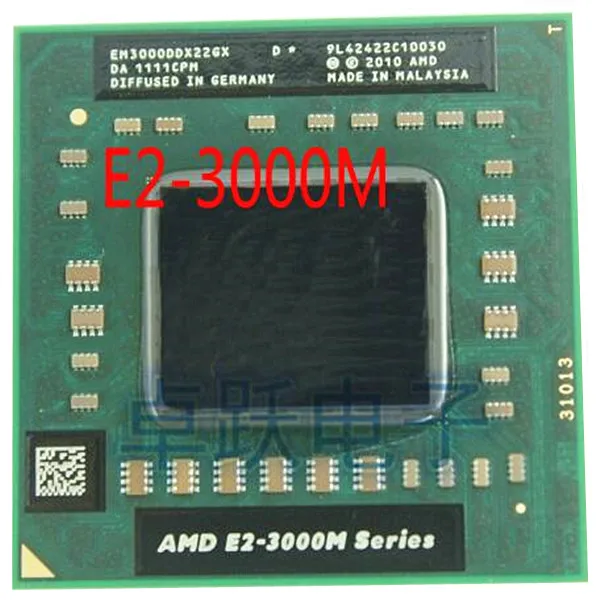
Original AMD E2-3000M CPU EM3000DDX22GX E2 3000m better then A4-3300M A6-3400M A8-3500M processor free shipping | Компьютеры и офис
История изменения цены
*Текущая стоимость 643,38 уже могла изменится. Что бы узнать актуальную цену и проверить наличие товара, нажмите "Добавить в корзину"
| Месяц | Минимальная цена | Макс. стоимость | Цена |
|---|---|---|---|
| Mar-18-2026 | 817.40 руб. | 833.44 руб. | 825 руб. |
| Feb-18-2026 | 662.63 руб. | 675.46 руб. | 668.5 руб. |
| Jan-18-2026 | 804.65 руб. | 820.80 руб. | 812 руб. |
| Dec-18-2025 | 797.30 руб. | 813.94 руб. | 805 руб. |
| Nov-18-2025 | 637.26 руб. | 650.80 руб. | 643.5 руб. |
| Oct-18-2025 | 784.61 руб. | 800.21 руб. | 792 руб. |
| Sep-18-2025 | 778.81 руб. | 794.13 руб. | 786 руб. |
| Aug-18-2025 | 772.82 руб. | 787.52 руб. | 779.5 руб. |
Описание товара
Tips:
Each item have been tested critically before shipment effected ,We have
build several testing stations specially for CPU ,please buy it with worry-free.
See before installing CPU:
1, remove the original CPU, clean up the dust on the fan and heat sink, clean up the residual heat sink in the original grease, especially hard grease must be thoroughly cleaned, this is very important!
2, in the correct direction into the new CPU, and at the top of the CPU coated with a thin layer of grease. Don't put too much, just can fill the gap between the top of the CPU metal contact and heat sink. The most ideal (in packets we presented silica gel as an example, squeeze appropriate 1/2 grease)
3, put it back to the heat sink, the first finger pressed fins move up and down a few times, so that the inside of the grease evenly spread and exhaust air, then according to the digital sequence tagging screw fins on (or diagonal) gradually tightened, each rotation laps screwed under a screw, not a put a screw in the end, the successive rotation until the fixed balance.
4, if the CPU in the machine after the point is not bright, can use the eraser to wipe the metal contact CPU plate (sometimes CPU floor dust or sweat may contact), or to the motherboard (the motherboard BIOS discharge clearance data). The memory can also be used on no eraser.
Note: for CPU, such as the discovery of CPU temperature is too high, or when the temperature is high and low instability, CPU and memory is not bright, please carefully check the above 4 to check, the vast majority of the problems can be solved.

AMD E2-3000M specifications
The specs can be used for short-term
listings on auction and classifieds sites
| General information | |
| Type | CPU / Microprocessor |
| Market segment | Mobile |
| Family | AMD E2-Series for Notebooks |
| Model number ? | E2-3000M |
| CPU part number |
|
| Frequency ? | 1800 MHz |
| Maximum turbo frequency | 2400 MHz |
| Package | 722-pin organic lidless micro Pin Grid Array (UOL722) |
| Socket | Socket FS1 |
| Weight | 0.2oz / 6g |
| Introduction date | June 14, 2011 |
| Architecture / Microarchitecture | |
| Microarchitecture | K10 |
| Platform | Sabine |
| Processor core ? | Llano |
| Core stepping ? | LN-B0 |
| CPUID | 300F10 |
| Manufacturing process | 0.032 micron |
| Data width | 64 bit |
| The number of CPU cores | 2 |
| The number of threads | 2 |
| Floating Point Unit | Integrated |
| Level 1 cache size ? |
2 x 64 KB 2-way set associative instruction caches 2 x 64 KB 2-way set associative data caches |
| Level 2 cache size ? | 2 x 512 KB 16-way set associative caches |
| Level 3 cache size | None |
| Multiprocessing | Uniprocessor |
| Features |
|
| Low power features | PowerNow! |
| Integrated peripherals / components | |
| Integrated graphics |
GPU Type: Radeon HD 6380G Shader cores: 160 Base frequency (MHz): 400 |
| Memory controller |
The number of controllers: 1 Memory channels: 2 Supported memory: DDR3-1333, DDR3L-1333 Maximum memory bandwidth (GB/s): 21.3 |
| Other peripherals |
|
| Electrical / Thermal parameters | |
| V core ? | 0.9125V - 1.4125V |
| Maximum operating temperature ? | 100°C |
| Thermal Design Power ? | 35 Watt |
why choose us?
1:Competitive Price:our company is committed to a computer peripheral accessories product sales, we have the most competitive Price.
2:One-Stop Shopping:We offer all Kinds of computer Parts.
3:Professional service:We have professional team and efficient work flow, which keep us offering the best service for our customers.
4:Tested before shipping;Safety packing box
5:Processor have one year warranty,memory have three years warranty.
Смотрите так же другие товары: